
Send Beautiful Emails Automatically
Stop sending ugly, boring emails. Create gorgeous, personalized emails that automatically go to the right person at exactly the right moment. Part of our growing library of 10+ actions, with new capabilities added every month.
Most Salesforce Emails Look Like This 😬
Subject: ✅ Your Appointment Is Booked!
Hi John Doe,
Your appointment has been successfully scheduled! Date: January 15, 2025 Time: 10:00 AM Location: Virtual Link
If you have any questions or need to make changes, feel free to reply to this email.
We look forward to seeing you!
— The Acme Corp Team
Boring. Generic. Unprofessional. Your customers deserve better.
Now Your Emails Can Look Like This ✨
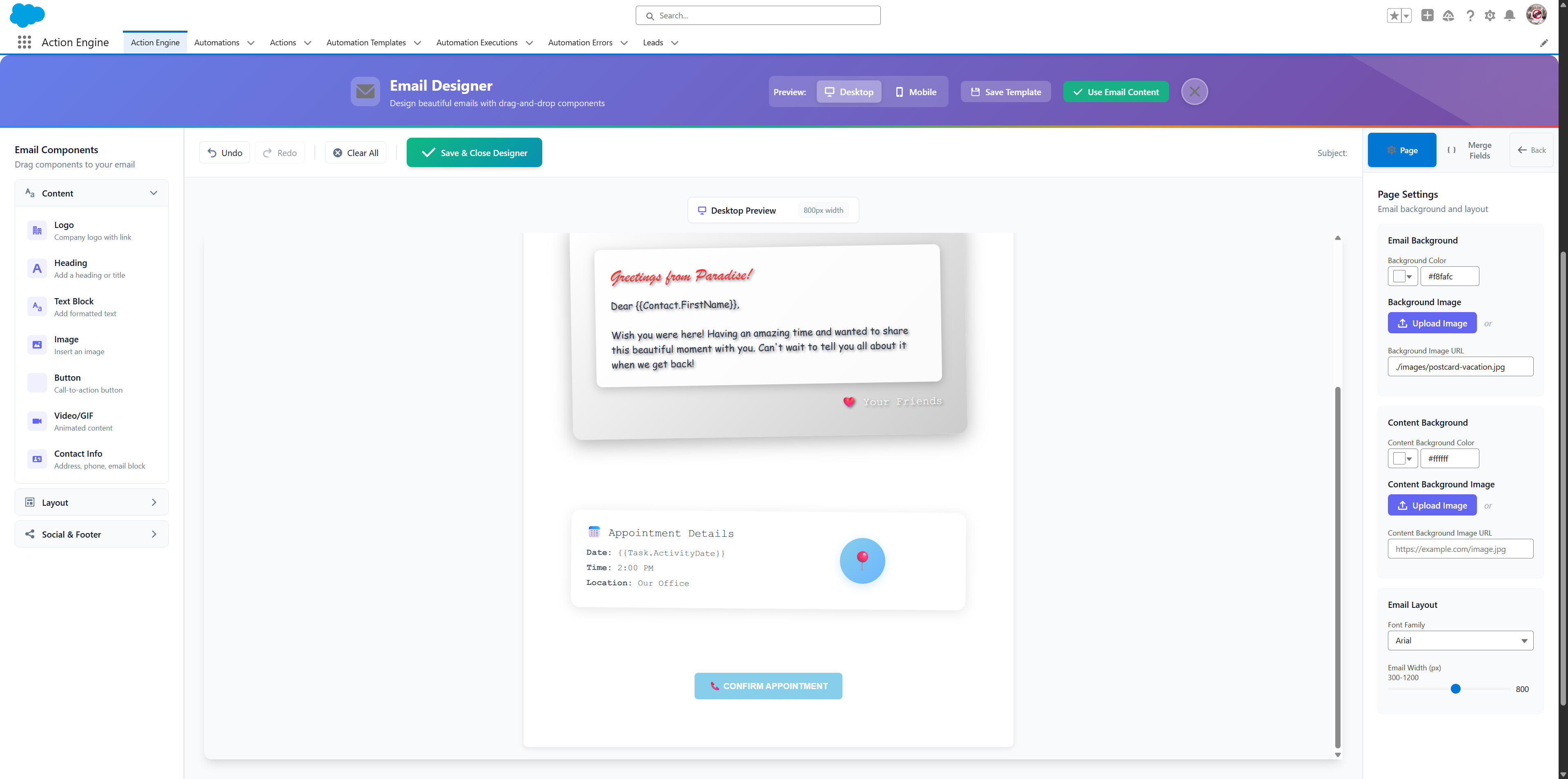
Professional, branded, beautiful emails that make your customers say "wow" - created in minutes, not hours.
How It Works (It's Really This Simple)
Four clicks and you're done. No technical skills required.
Choose When This Happens
Pick your "if" statement - when a lead is created, when a deal closes, when it's someone's birthday. This is what starts everything.
When...
Lead status changes
Pick Who Sends & Receives
Choose who the email comes from and who gets it. Simple options like "the person who owns this record" or "the customer's email."
From & To
Smart recipient selection
Design Your Email
Drag and drop to create beautiful emails. Add your logo, change colors, insert customer names automatically. It's like building with LEGO blocks.
Drag, drop, done!
Watch The Magic Happen
Every time your trigger happens, your beautiful email automatically goes out to the right person. No manual work, ever.
Automatic
Emails send themselves
Smart Recipient Selection
The most flexible email routing system in Salesforce. Choose exactly who sends and who receives, with smart options that just work.
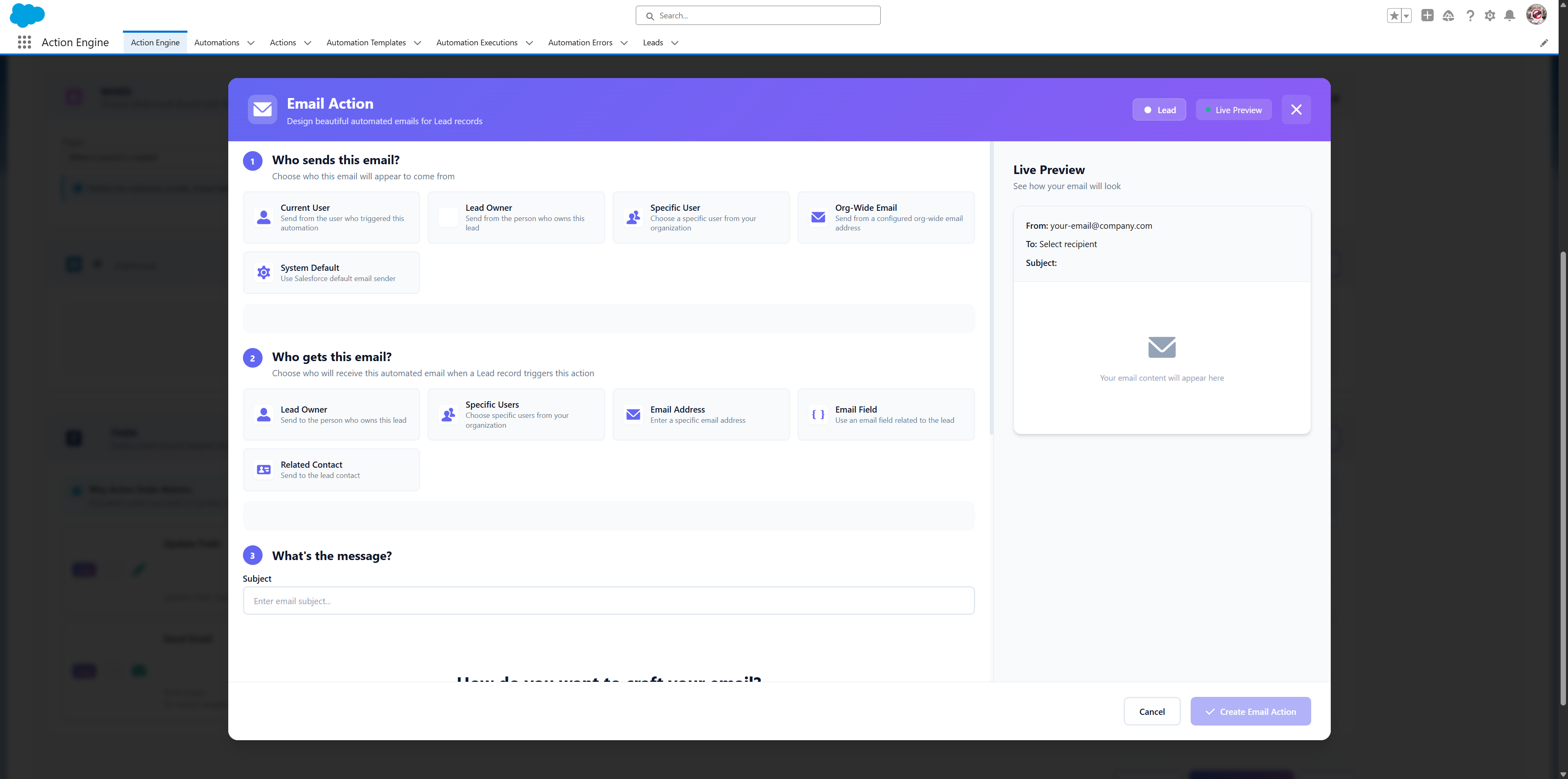
📤Who Sends The Email
- •Current User - Send as whoever triggered this automation
- •Record Owner - Send as the salesperson or owner
- •Specific User - Pick anyone from your team
- •Org-Wide Email - Send from your company address
📥Who Gets The Email
- •Record Owner - Send to whoever owns this record
- •Specific User - Pick anyone from your team
- •Any Email - Type in any email address
- •Field Email - Use an email saved on the record
- •Related Contact - Find the customer automatically
What Makes This So Special?
Other tools make you choose between simple or powerful. We give you both.
Makes Every Email Personal
Automatically includes their name, company, deal amount, or any other info from Salesforce. Every email feels like you wrote it just for them.
Looks Professional Every Time
Your emails will look like they came from a marketing agency. Beautiful designs, perfect formatting, works on phones and computers.
Real Customer Email
🎉 Congratulations, Sarah!
Your project "Website Redesign" just moved to the final stage!
We're excited to deliver this $15,000 project next week. Your dedicated project manager will reach out tomorrow with next steps.
Sent automatically when project status changed
Who Uses This?
Anyone who wants their business to look more professional
Sales Teams
"Thanks for the meeting" emails that actually look professional
Marketing Teams
Welcome sequences and nurture campaigns that don't look like spam
Support Teams
"Your issue is resolved" emails that make customers happy
Small Business Owners
Look like a big company without hiring a marketing team
The Magic Moment ✨
Picture this: A customer just signed a big deal. Within seconds, they get a beautiful, personalized "Welcome to the family!" email with their name, deal details, and next steps.
They think: "Wow, these people really have their act together."
That's the moment your business goes from looking amateur to looking like the pros. And it happens automatically, every single time.
Ready to Send Emails That Actually Look Good?
Stop embarrassing yourself with ugly emails. Start your free trial and see how professional your business can look.